



This article focuses on Windows Hello for Business as used within Microsoft Entra ID (formerly Azure AD) MFA flows. Many of the same principles apply to other desktop-based authentication methods like Okta Fastpass.
1. Windows Hello Is Not 2FA
Windows Hello lets users unlock their Windows device using either a biometric (fingerprint or face recognition) or a PIN. These are alternatives — not layers. By design, Windows Hello is single-factor authentication at the point of use. It does leverage the device’s TPM chip, but that is a hardware binding, not a second independent factor the user actively controls or presents.
The core problem: Windows Hello requires a PIN to always be set up, and users can choose to enter it instead of a biometric at any time. You cannot enforce biometric-only. This means the PIN is always an available escape hatch and an attacker who learns or guesses it bypasses biometrics entirely.
2. The PIN That’s Always There
This is the detail most IT leaders miss when evaluating Windows Hello as an MFA factor:
- Windows Hello mandates a PIN be set up before biometrics can be used
- The PIN is always available as a fallback – it cannot be disabled by policy
- Biometric failures (dust, lighting, moisture, hardware issues) automatically fall back to PIN
- An employee, or an attacker, can simply click “Sign-in options” and choose PIN at any time
The result is that even if you intend to enforce biometric authentication, you are operationally enforcing a PIN, which is something you know, not something you are. One factor.
3. Why This Matters for Microsoft Entra ID Specifically
Microsoft Entra ID is widely used as the identity backbone for enterprise MFA. Here’s the problem when Windows Hello sits inside that flow:
- Windows Hello for Business can be configured as a Phishing-resistant 2FA/MFA method in Entra
- Entra Conditional Access policies may accept it as satisfying MFA requirements
- But if Windows Hello is used to unlock the device and again as the MFA factor inside Entra, you are presenting the same factor twice – once at device login and once at app authentication
Prompting the same factor twice does not produce 2FA. For authentication to qualify as true MFA, two independent and distinct factors must be involved. A PIN used to unlock a device is not a second factor when the same PIN (or the same Windows Hello session) is used again to authenticate into an application.
4. What If You Add a Password on Top?
Some organizations enforce a password alongside Windows Hello as an attempt to create a second factor. This is well-intentioned but does not solve the problem:
- A password is something you know
- A PIN is also something you know
- Two knowledge factors = 1FA, regardless of how many prompts are shown
Additionally, in most enterprise setups, the password is stored in a credential manager or SSO tool that is itself unlocked via Windows Hello – which means even the password entry is ultimately gated by the same single factor.
5. Why Regulated Industries Ban Phones – and Why That Makes This Worse
Many organizations in regulated verticals have already removed the most common MFA fallback: the personal phone. Reasons include:
- Finance & Insurance: Phones banned on the floor due to data security and compliance requirements (PCI DSS 4.0, SOX, GLBA, CDP, etc)
- BPO / Call Centers: No camera, mic, or personal device policies to protect client data and prevent leakage
- Healthcare (HIPAA): Personal device restrictions around patient data environments
- Government / Defense contractors: Controlled unclassified information (CUI) environments prohibit personal devices
For these organizations, Windows Hello is often seen as the answer to phone-free MFA. It is company hardware, it is already deployed, and Entra supports it. But as established above, it does not actually deliver true 2FA – which means these organizations may believe they are compliant when they are not.
6. What Entra’s Conditional Access Policies Actually Enforce
A default Entra Conditional Access policy may accept Windows Hello for Business as satisfying MFA, even when both factors share the same verification mechanism. To ensure genuine compliance, administrators must:
- Configure authentication strength policies that explicitly require two independent factors
- Avoid accepting Windows Hello as both the device unlock method and the Entra MFA factor in the same session
- Add a second factor that is genuinely independent, not derived from the same Windows Hello session or the same device TPM binding
7. Real Solutions: What Qualifies as a True Second Factor for Entra
To meet true 2FA standards alongside Windows Hello or password-based flows in Entra, you need a second factor that is genuinely independent. Options include:
- FIDO2 hardware security key (e.g. YubiKey): Something you physically have. Highest security, phishing-resistant, but requires procurement and distribution logistics.
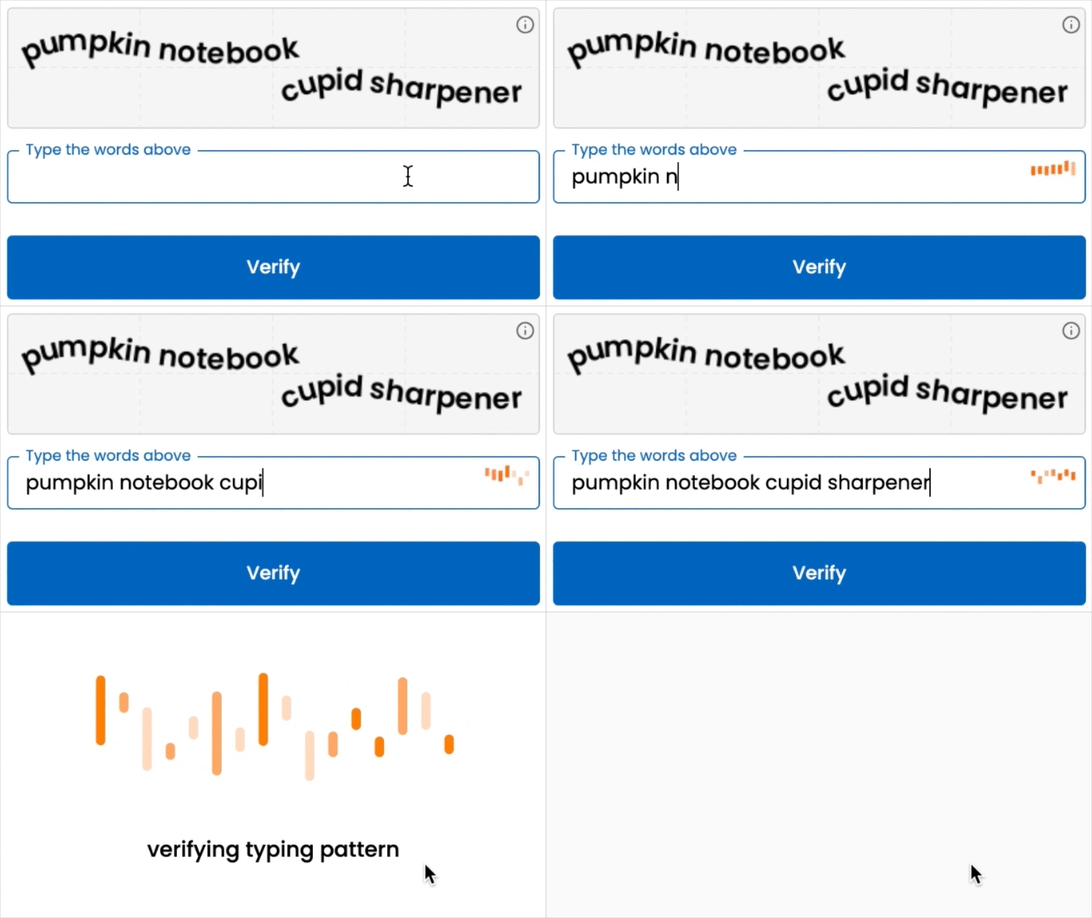
- TypingDNA Verify: A behavioral biometric (something you are) that works by analyzing how you type directly inside Entra MFA flows via the External Authentication Method (EAM) integration. No phone required, no hardware to distribute, no personal device involved. Employees simply type 4 words. Works on any company-issued workstation.
- Company-issued phone (if allowed): Microsoft Authenticator or TOTP app. Viable where BYOD restrictions do not apply.
For regulated industries where phones are banned and hardware key logistics are a challenge, TypingDNA Verify is the most operationally practical independent second factor available for Entra today. New employee enrollment is immediate. Deprovisioning happens in Entra. Nothing to lose, nothing to ship.
8. The Need for Redundancy in MFA
Even with a strong primary MFA method, every organization should ensure employees have access to at least two compliant methods, neither of which should depend on a personal device. Here’s why:
- Hardware keys can be lost, forgotten, or damaged
- Biometrics don’t always recognize you (illness, injury, new device, etc)
- A single-method policy creates a support burden every time that method fails
TypingDNA Verify is well-suited as either the primary or the backup method in this redundancy model – complementing hardware keys for privileged accounts, or serving as the primary method for general workforce access where key distribution is impractical.
9. Conclusion: You May Not Be Compliant
Windows Hello on its own, used within a Microsoft Entra ID MFA flow, does not meet true 2FA standards unless paired with a genuinely independent second factor. The mandatory PIN, the biometric fallback behavior, and the device-session reuse all collapse what appears to be two-factor authentication into one.
For organizations in regulated industries where phones are banned, the compliant path is clear: a second factor that is independent of Windows Hello, requires no personal device, and integrates cleanly with Entra. TypingDNA Verify was built exactly for this gap.
Let me say it plainly: if you are relying on Windows Hello alone – or Windows Hello plus a password – inside Microsoft Entra, you are not meeting 2FA requirements. And in environments where phones are banned, you may have no compliant fallback at all.
Want to see the difference?
Contact us to learn more about TypingDNA Verify and how it integrates with your Microsoft Entra ID.
Also, get a 30-day pilot and experience MFA that works without a phone in sight.