


Built for organizations who want a portable phone-free 2FA authenticator and vault for sensitive information, running on Mac, Windows, and Linux.
For a long time, there has been a gap between simple authenticator apps and full password managers. One gives you 2FA codes but little else. The other often pushes you toward a cloud vault, a browser-first workflow, or more complexity than many business users actually want.
Portable Vault is our answer to that gap.
Portable Vault by TypingDNA is a local-first desktop app that combines 2FA, logins, and secured notes in one portable vault.
It is built on the same secured model as our 2FA Authenticator. Your secrets stay encrypted and local, while TypingDNA protects access to the key through the same TypingDNA-based login flow.
TypingDNA keeps your key. You keep your encrypted vault.
That makes Portable Vault a natural fit for businesses that want a desktop 2FA authenticator that is also portable and useful for storing other important data such as credentials, keys, addresses, bank transfer data, recovery notes, and other sensitive information.
In other words, this is not just another password manager, and it is not just another authenticator. It is a practical local vault secured with your typing biometrics (a.k.a. the way you type).
From 2FA Authenticator to Portable Vault
Portable Vault started from a request we received from a business client already using 2FA Authenticator by TypingDNA. They liked the idea of a desktop-based 2FA authenticator, but asked whether we could make it portable, so it could run from a USB stick on both Mac and Windows.
We built it, and while doing so, extended the concept beyond TOTP codes.
Instead of protecting only authenticator secrets, Portable Vault became a broader local vault that can contain:
- 2FA / TOTP secrets
- logins and passwords
- secured notes
That means users can keep not only their 2FA codes, but also other important information they often need nearby, such as logins, keys, addresses, recovery notes, and other sensitive data.
In that sense, 2FA Authenticator is the focused browser-based implementation of the model, while Portable Vault is the broader desktop vault built on the same foundation.
How Portable Vault works
The core idea is simple: The encrypted vault and the key should not live together.
The vault itself stays local, on the user’s device or USB stick, and remains encrypted at rest. The encryption key is kept separately and is only returned after successful authentication.
Users can unlock with:
- TypingDNA using email + a known phrase
- TypingDNA using email + password for even stronger protection
Once authenticated, the encryption key is returned and the vault is decrypted locally on the user’s device (in memory). In practice, this creates a layered protection model that includes up to 3 different factors: possession of the USB stick or local device (possesion), a matching typing pattern (inherence), and an optional master password (knowledge).
From a technical perspective, current vault uses AES-GCM encryption, the standard AES encryption for authentication secrets. Argon2 is also used for credential-related derivation, including local file naming, so that the user’s plain email address is not exposed directly in local storage and cannot be easily derived from the filename.
For additional security, USB sticks themselves can be encrypted. On macOS, this can be done with standard APFS encryption. Some dedicated secure USB drives, such as Lexar DataShield, can also be encrypted and used across Windows and other operating systems.
This makes a simple USB stick running Portable Vault compete with hardware keys at a fraction of the cost.
Why this sophistication matters
Many tools keep encrypted data and the means to unlock it inside the same general ecosystem. Portable Vault takes a different approach.
TypingDNA keeps your key. You keep your encrypted vault.
This means that copying or stealing the vault file alone is not enough to open it.
For businesses that care about local control, reduced phone dependence, and a simpler way to keep secrets safe, this is a strong and practical model.
The idea is straightforward: keep the vault with the user, keep the key separate, and use TypingDNA to help verify the person asking for access.
What is inside Portable Vault
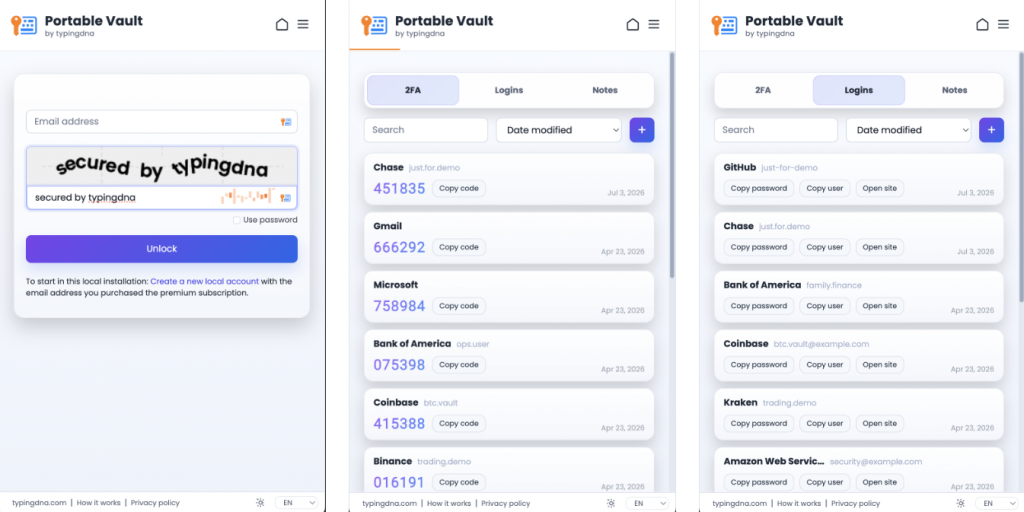
Portable Vault combines three essentials in one simple app:
1. 2FA
Store TOTP secrets, scan QR codes, and generate 6-digit codes directly from the desktop, without requiring a phone.
2. Logins
Keep usernames and passwords in one secure place, with a built-in password generator when needed.
3. Secured notes
Store backup codes, recovery information, keys, addresses, private references, bank information, and other sensitive information in a flexible note format.
Built to travel with the user
Portable Vault runs on Mac, Windows, and Linux and can live on a local drive or USB stick.
That makes it useful for organizations that want a portable 2FA authenticator that does not require phones, but also want users to have one secure place for other sensitive data that may need to travel with them.
It is especially relevant for controlled environments where phones are restricted, for business users who prefer local-first security, or for teams that want a practical secure vault without depending on a cloud-hosted password manager.
Import, export, and compatibility
Portable Vault is built to be practical, not closed.
It supports:
- CSV import from common formats such as LastPass, 1Password, Bitwarden, Dashlane, KeePass, Chrome, and legacy 2FA Authenticator
- CSV export in standard format
- QR import from image
- Google Authenticator export QR import, including multi-account export QR
- merged imports that add only new items and skip duplicate-looking entries
This makes it easier to move data in, keep backups, and adopt the product without starting from scratch.
Available privately for business clients today
Portable Vault is currently available only to a limited number of business clients. If you want to test/purchase a business license please let us know about your interest and we’ll try to accommodate you.
It is a strong fit for any organization that needs:
- a phone-free 2FA authenticator for employees
- a portable local vault
- a simple app that can also store logins, passwords, notes, keys, addresses, and recovery details
- the same core secured model already used by 2FA Authenticator
Why we built it
We built Portable Vault because some business users want something very specific: a 2FA authenticator that doesn’t require phones, that is also portable, local-first, and useful for storing the other sensitive items people keep reaching for, such as passwords, keys, addresses, and recovery notes.
That is exactly what TypingDNA Portable Vault is meant to be.
It combines 2FA, logins, and secured notes in one place, while using the same TypingDNA-secured login model used by 2FA Authenticator, a product with hundreds of thousands of happy users.
TypingDNA keeps your key. You keep your encrypted vault.
If that sounds like the missing piece between an authenticator and a full cloud password manager, that is because it is.
Contact us to get a quick quote, learn more, or if you want to try Portable Vault for yourself.